
Logging
The system automatically generates logs to track the status and operation of the machine. These logs are stored in the following path:
C:\ProgramData\Metamation\Vulcan\Log\Year (YYYY)\Month (MM)\Date (DD)
Log types and descriptions
1. Error log
-
Purpose: Records all alarm and message history.
-
Use: Helps technicians identify when and what type of error occurred.
-
Typical Content:
-
Timestamp
-
Error/Alarm Code
-
Message Description
-

2. Protective window monitoring log (Lumi measure log)
-
Purpose: Tracks contamination and replacement events for the protective window.
-
Use: Ensures maintenance is performed at appropriate intervals to maintain laser quality and safety.
-
Timestamp
-
Contamination Detected
-
Replacement Done
-

3. Mk log
-
Purpose: Records all changes made to Mk parameters.
-
Use: Allows for traceability and rollback of configuration changes.
-
Typical Content:
-
Timestamp
-
Parameter Name
-
Previous Value
-
New Value
-

4. Operation log
-
Purpose: Captures the background operation history of Vulcan.
-
Use: Useful for auditing machine behavior and system-level operations.
-
Typical Content:
-
Timestamp
-
Operation Type
-
Description/Status
-

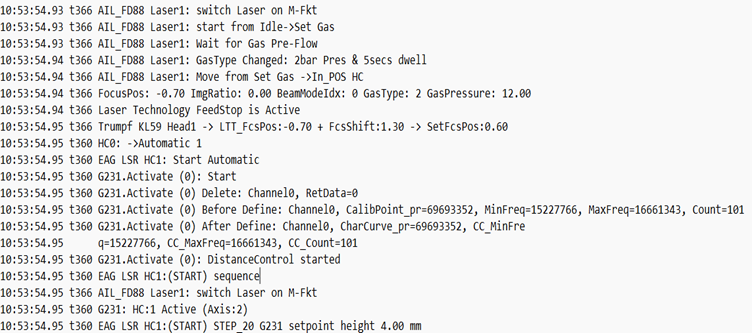
5. Trace log
-
Log File Path:
C:\ProgramData\Metamation\Vulcan\Log\Trace. -
Purpose: Captures the trace (360-Height Control Sequence and 366-Laser Sequence).
-
Use: Useful for diagnosis of any sporadic issues happened during cutting Process.
-
Typical Content:
-
Timestamp
-
Trace No
-
Description
-
How to enable trace logging
-
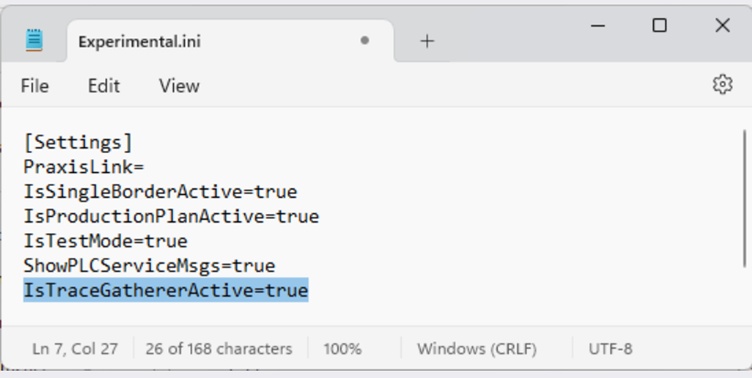
Edit the Experimental settings
-
Navigate to:
C:\ProgramData\Metamation\Vulcan\Data\Experimental.iniand change the condition from false to true in "IsTraceGathererActive="
Trace file settings
-
Interval: Trace files are gathered every 10 seconds.
-
Retention: The trace files are kept for 2 days and then automatically deleted.
-
Trace Numbers: Trace files include numbers 360(Height Control) and 366(Laser).
Changing trace file settings
-
Navigate to:
C:\Program Files\Metamation\Vulcan\TraceGatherer. -
Edit the settings.json file.
-
Open with Notepad++.

-
Make the necessary changes to the settings.
-
| Close the application before editing settings.json to avoid conflicts or corruption. |