
Pallet Changer Configuration
In PLC Options, Select Function Parameters to access Pallet Changer Configuration.
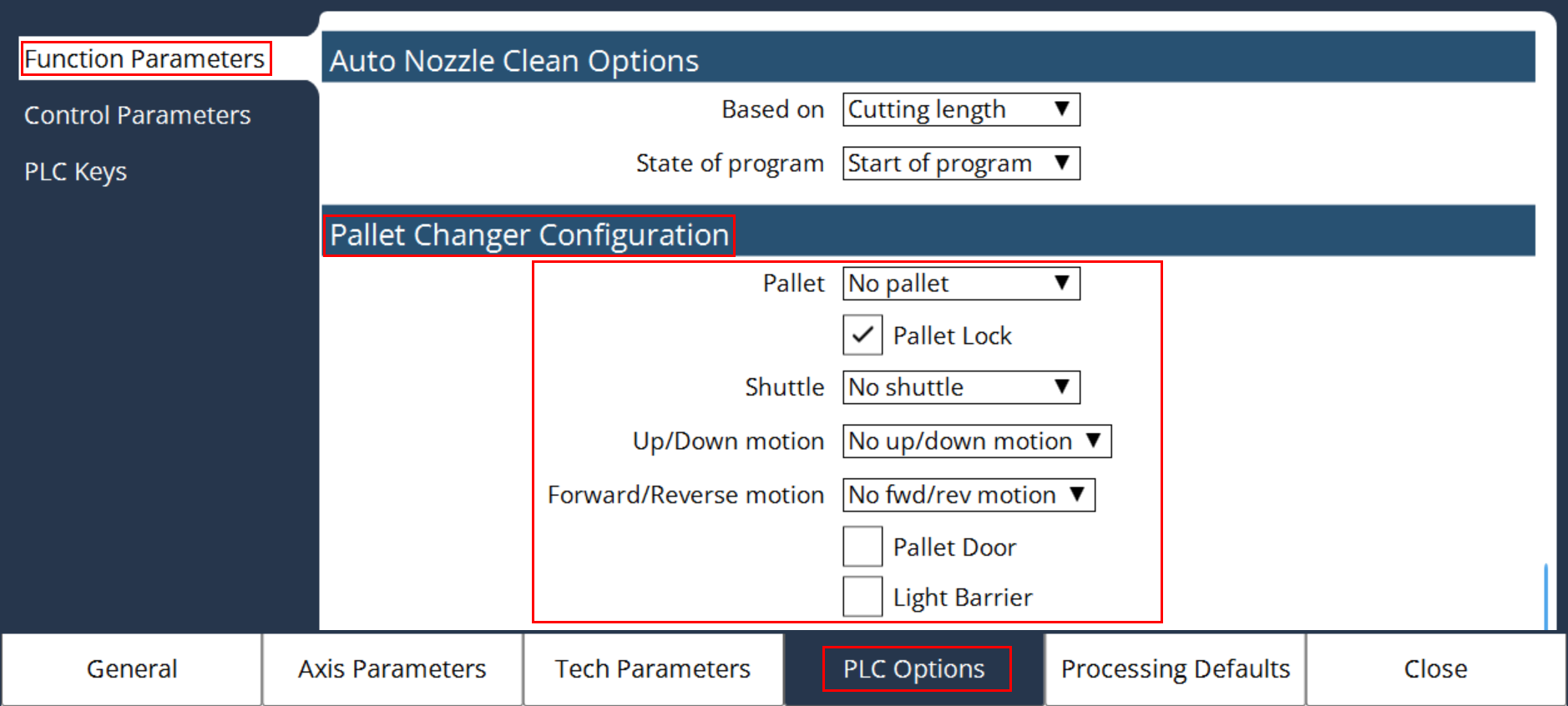
Pallet
Select the type of pallet used in the machine:
-
No Pallet - Pallet functions are disabled in the PLC
-
Single Pallet - Only one pallet in the machine
-
Double Pallet - Two pallets in the machine
Pallet Lock
Enables the Pallet Lock function in the PLC.
If the Pallet has the locking system to ensure its position and to avoid the shaking of Pallet due to axes motions, enabling it will check the feedback of lock position in the PLC. Also make sure the lock is released before the start of Forward/Reverse motion of the Pallet.
Shuttle
Defines the type of shuttle system used in the Pallet and following are the options available:
-
No Shuttle - No Pallet motion.
-
1 level shuttle - Pallet moves forward & reverse, whereas the cutting height remains the same.
-
2 level shuttle, single drive - There are 2 pallets with single drive such that a forward motion will bring the Top pallet to the cutting position and the reverse motion will bring the Bottom pallet to the cutting position with a difference in cutting height. Hence according to the Top/Bottom pallet, the Z- axis negative limit is dynamically updated in the PLC with the value mentioned in the Technology parameter.
-
2 level shuttle, double drive - There are 2 pallets with individual drive for each pallet, with difference in cutting height. Hence according to the Top/Bottom pallet, the Z-axis negative limit is dynamically updated in the PLC with the value mentioned in the Technology parameter.
Up/Down motion
Defines the type of drive system used for Up/Down motion in the Pallet.
-
No Up/Down motion
-
Hydraulic system
-
Induction motor
-
Servo motor
According to the type of drive system, the respective functions are activated in the PLC.
Forward/Reverse motion
Defines the type of drive system used for Forward/Reverse motion in the Pallet.
-
No For/Rev motion
-
Induction motor
-
Servo motor
According to the type of drive system, the respective functions are activated in the PLC.
Pallet Door
The Enable/Disable option for the Pallet Door determines whether the door will automatically open and close during pallet movement.
-
Enabled: The system will monitor the Pallet Door feedback and control pallet movement accordingly.
-
Disabled: The system will not check for Pallet Door feedback, and the pallet will move without the door status verification.
Light Barrier
Trumpf machines are equipped with a Light Barrier at the loading side of the Pallet Changer as a safety feature.
-
If a person or object interrupts the pallet changer area, a Light Barrier Interrupted alarm will be triggered.
-
To resolve the alarm, press the designated key on the control panel.