
Vulcan OEM Manual

  • Vulcan OEM Manual
  • General
    • Installation
    • Changing User Levels
    • Changing the Flavor
    • Changing the GCode format
    • Technology data format
  • Machine Settings
    • General Parameters
      • General
      • Controller
      • Memory Reservation
      • Axes Correction File
    • Axis Parameters
      • Configuration Parameters
        • Axis Properties
        • Axis Connection
        • Axis Address Assignment
        • Sync Connection
        • Interpolation Filter Time
      • Encoder (Only for Analog Axis)
      • Control (Only for Analog Axis)
      • Resolution
      • Monitoring
      • Referencing
      • Speed & Acceleration
      • Corrections
      • Synchronous
      • Handwheel
      • Configuration of Laser Power Control (LPC)
      • Configuration of Pallet
    • Technology Parameters
      • Analog Scaling
      • M Functions
      • Laser Technology
        • Custom Parameters 1
        • Custom Parameters 2
        • Custom Parameters 3
        • Custom Parameters 4
      • Exhaust System
      • Machine Database
    • PLC Options
      • Function Parameters
        • PLC Custom Parameters
        • Jog Parameters
        • Miscellaneous
        • Tandem Operation Options
        • Nozzle Cleaning Options
        • Auto Nozzle Clean Options
        • Pallet Changer Configuration
        • Laser Technology Miscellaneous Control
        • Machine Miscellaneous Control
        • Emulate Hardware
      • Control Parameters
      • PLC Keys
  • Service settings
    • Nozzle Changer
    • Pallet changer settings
    • Status light
    • Suction cup layout
    • Automation Interface
    • KL59, Laser & Optics
    • Automated corner optimization
    • Calibration of the pilot laser
    • PLC functions for service's maintenance/ repair work for KL59
    • DCA settings
    • Miniplayer
    • Backup settings
    • Error data, backup, restore
  • Programming manual
    • DIN Programming
    • LST Programming
  • Error messages
    • PLC error messages
      • 2.10.2000 CAN_OPEN - Device not found
      • 2.10.872 Laser - Back Refelction Alarm
      • 2.10.819 Light Barrier Interrupted Pallet Motion Aborted
      • 2.10.814 Program Start aborted due to Pallet position
      • 2.10.202 Emergency Stop Pressed
      • 2.10.865 Laser - Emission failed
      • 2.10.454 HMI PLC Communication Lost
      • 2.10.826 Pallet Door is Opened close and continue the program
      • 2.10.824 Lanny Valve Under Voltage Actuator
      • 2.10.829 Pallet Feed Hold is active
      • 2.10.864 Laser - Status Error
      • 2.10.7693 KL59 - Error External 24V not present
      • 2.10.808 Air Pressure Low - Program Paused
      • 2.10.809 Pallet Motion is not Possible
      • 2.10.817 Nitrogen Pressure Low - Program Paused
      • 2.10.605 System Parameter Out of Range
      • 2.10.7003 Axis - Controller Enable Missing
      • 2.10.7200 Empower - Calibration data file not found
      • 2.10.806 Safety Door Opened - Program Paused
      • 2.10.7402 KL59 - Calibration data file not found
      • 2.10.7415 KL59 - No Lumi reference value
      • 2.10.7418 KL59 - Focus Motor command position is lesser than Negative Limit
      • 2.10.7419 KL59 - Focus Motor command position is greater than Positive Limit
      • 2.10.815 Axes Jog aborted due to Pallet position
      • 2.10.7416 KL59 - PGM Warning based on Linearity value
      • 2.10.811 Pallet Forward/Reverse Motion is not Possible
      • 2.10.7208 Empower - Command Focus position is greater than Positive Limit
      • 2.10.7408 KL59 - Lens Index Pin Extend time out
      • 2.10.7207 Empower - Command Focus position is lesser than Negative Limit
      • 2.10.7417 KL59 - Index pin retracted during swivel motion
      • 2.10.7412 KL59 - Command Focus position is greater than Positive Limit
      • 2.10.7409 KL59 - Lens Index Pin Retract time out
      • 2.10.7411 KL59 - Command Focus position is lesser than Negative Limit
      • 2.10.816 External Start Stop Btn Activated
      • 2.10.812 Pallet Up/Down Motion is not Possible
      • 2.10.870 Laser - Gas Pressure Cmd High for Low Pres Reg
      • 2.10.805 Grease Lubrication No Pressure generated
      • 2.10.802 Oil Lubrication No Pressure generated
      • 2.10.503 NC not Initialized
      • 2.10.514 NC Axes not homed to start the Program
      • 2.10.7209 Empower - Minimum and Maximum Frequency value error
      • 2.10.7403 KL59 - Minimum and Maximum Frequency value error
      • 2.10.827 Pallet Door Closed
      • 2.10.866 Laser - Gas Pressure Low
      • 2.10.513 NC Automatic mode is Active
      • 2.10.7012 Axis - Z-axis Negative limit changed for Pallet Position
      • 2.10.7005 Axis - Negative Software Limit Active
      • 2.10.7016 Axis - Change the X-axis offset value
      • 2.10.7017 Axis - Change the Y-axis offset value
      • 2.10.7004 Axis - Positive Software Limit Active
      • 2.10.873 Laser - Invalid Tech Parameter
      • 2.10.7013 Axis - Move Z-axis to Park Pos to Start Homing
      • 2.10.643 System PLC Message to HMI for Program Parameter Tx String Buffer OverFlow
      • 2.10.7102 Precitec - Cable Cut
      • 2.10.7103 Precitec - Body Touch
      • 2.10.828 Service key activated
      • 2.10.7203 Empower - Cable Cut
      • 2.10.7204 Empower - Body Touch
      • 2.10.7152 Precitec - PC - Collimating lens warning temperature - Contact Manufacturer
      • 2.10.7405 KL59 - Nozzle Lost
      • 2.10.7151 Precitec - PC - Window warning Temperature - Replace the Protective Window
      • 2.10.7024 Axis - Drive not supported via FieldBus
      • 2.10.7406 KL59 - Cable Cut
      • 2.10.2003 CAN_OPEN - Command Not allowed
      • 2.10.7153 Precitec - PC - Focus lens warning temperature - Contact Manufacturer
      • 2.10.504 NC Wrong Firmware downloaded
      • 2.10.868 Laser - Multiple Pierce Steps = 0
      • 2.10.807 Oxygen Pressure Low - Program Paused
      • 2.10.2001 CAN_OPEN - Axis End Limit Active
      • 2.10.7101 Precitec - Nozzle Lost
      • 2.10.7202 Empower - Nozzle Lost
      • 2.10.7154 Precitec - PC - Head warning tempeartue - Contact Manufacturer
      • 2.10.7155 Precitec - PC - Diffusion warning level - Contact Manufacturer
      • 2.10.7434 KL59 - Warning Pressure Sealing gas limit reached
      • 2.10.810 Pallet Enable Input is OFF
      • 2.10.7432 KL59 - Warning Temperature Head Or IO module reached
      • 2.10.7104 Precitec - Focus position time out
      • 2.10.7205 Empower - Focus position time out
      • 2.10.7400 KL59 - Height Sensor main pgm start-up time out
      • 2.10.7126 Precitec - PC - Diffused light Protective window COL Max level exceeded
      • 2.10.7014 Axis - X Negative Limit changed for Tandem Operation
      • 2.10.7015 Axis - X Positive Limit changed for Tandem Operation
      • 2.10.7410 KL59 - Focus position time out
      • 2.10.7401 KL59 - IO Module main pgm start-up time out
      • 2.10.869 Laser - Invalid Pierce type
      • 2.10.7125 Precitec - PC - Diffused light Protective window Max level exceeded
      • 2.10.956 Gantry not in Park Position for Single head operation - Pgm Aborted
      • 2.10.500 NC Wrong M Function in Program
      • 2.10.501 NC Wrong H Function in Program
      • 2.10.638 System NC Program Start button is still active
      • 2.10.7433 KL59 - Warning Temperature Distance Sensor reached
      • 2.10.639 System NC Program Stop button is still active
      • 2.10.7006 Axis - Feed Override 0
      • 2.10.820 Lanny Valve Over Temperature Electronics
      • 2.10.7100 Precitec - Calibration Timeout
      • 2.10.7123 Precitec - PC - Leak Protective window Max Pressure exceeded
      • 2.10.7201 Empower - Calibration Timeout
      • 2.10.7105 Precitec - Sensor Insert Temperature Exceeded
      • 2.10.7438 KL59 - Warning Temperature Swivel Shaft reached
      • 2.10.640 System M function file not available
      • 2.10.7532 KL59 - Error Temperature Head Or IO module reached
      • 2.10.813 Auto Pallet not possible for this position
      • 2.10.642 System CNC License Expired
      • 2.10.7118 Precitec - PC - Collimating lens max temperature exceeded
      • 2.10.7404 KL59 - Calibration Timeout
      • 2.10.7019 Axis - Reset the Focus axis offset to 0
      • 2.10.7023 Axis - EtherCAT Write Drive Object Error
      • 2.10.7124 Precitec - PC - Protective window cartridge COL missing
      • 2.10.7413 KL59 - Warning Active
      • 2.10.952 CNC ID in the Program & PLC doesn't match - Pgm Aborted
      • 2.10.641 System M function file Corrupted
      • 2.10.7022 Axis - EtherCAT Read Drive Object Error
      • 2.10.955 Single Head Operation Reference is wrong - Pgm Aborted
      • 2.10.7414 KL59 - Error Active
      • 2.10.951 CNC1 & 2 Tandem Pgm Name are different - Pgm Aborted
      • 2.10.954 CNC1 & 2 Other Gantry Not in its Limit - Pgm Aborted
      • 2.10.958 Tandem Offset Program selection only in Slave Control
      • 2.10.459 Technology Requested DataSet is Invalid
      • 2.10.7106 Precitec - Plasma Percentage Exceeded
      • 2.10.7567 KL59 - Error Access to Temperature Distance Sensor
      • 2.10.7010 Axis - Gantry Position difference > Set Limit value
      • 2.10.7119 Precitec - PC - Focus lens max temperature exceeded
      • 2.10.7501 KL59 - Error Initialization
      • 2.10.957 Tandem Pallet not in Cutting Position - Pgm Aborted
      • 2.10.485 Not Possible to Switch from Test Run to Normal Run
      • 2.10.7533 KL59 - Error Temperature Distance Sensor reached
      • 2.10.877 Error in number of Miscellaneous Control Parameter
      • 2.10.7002 Axis - Speed null
      • 2.10.7122 Precitec - PC - Cutting gas pressure max exceeded
      • 2.10.7534 KL59 - Error Pressure Sealing Gas limit reached
      • 2.10.7566 KL59 - Error Access to Temperature Cutting head
      • 2.10.818 Pallet Door Open Motion is not Possible
      • 2.10.7117 Precitec - PC - Linear Drive no reference travel
      • 2.10.707 Height Control G231 not Activated in Din Program
      • 2.10.876 Error in loading Miscellaneous Control Parameter
      • 2.10.7113 Precitec - PC - Window Max Temperature Exceeded
      • 2.10.7116 Precitec - PC - Linear Drive low supply voltage
      • 2.10.830 Pallet Hydraulic Pump time out
      • 2.10.831 Pallet Fwd/Rev motion time out
      • 2.10.7538 KL59 - Error Temperature Swivel Shaft reached
      • 2.10.953 CNC1 & 2 Reference are different - Pgm Aborted
      • 2.10.7115 Precitec - PC - Linear Drive no supply voltage
      • 2.10.780 Height Control G231 Function Block not Active
      • 2.10.7031 Axis - Configured for more than 1 technology
      • 2.10.7111 Precitec - PC - Window Cattridge not Present
      • 2.10.7120 Precitec - PC - Head max tempeartue exceeded
      • 2.10.7121 Precitec - PC - Diffusion max level exceeded
      • 2.10.7509 KL59 - Error Current Distance Sensor
      • 2.10.803 Grease Lubrication Started
      • 2.10.7021 Axis - CAN Write Drive Object Error
      • 2.10.7127 Precitec - PC - Humidity Max Level exceeded
      • 2.10.7700 KL59 - Error Access to Blocking Gas Sensor
      • 2.10.470 Cutting Head is Configured for 2 Technology
      • 2.10.7568 KL59 - Error Access to Sealing Gas Sensor
      • 2.10.950 CNC1 & 2 Tandem Limit Reached - Pgm Paused
      • 2.10.7020 Axis - CAN Read Drive Object Error
    • NC error messages
      • 2.1.6
      • 2.1.14
      • 2.1.25
      • 2.1.27
      • 2.1.42
      • 2.1.44
      • 2.1.80
      • 2.1.81
      • 2.1.106
      • 2.1.107
    • NC error messages 2
      • 2.1.110
      • 2.1.115
      • 2.1.110
      • 2.1.139
      • 2.1.144
      • 2.3.102
      • 2.3.213
      • 2.3.276
      • 2.3.292
      • 2.3.293
      • 2.3.296
      • 2.3.402
      • 2.3.420
      • 2.3.434
      • 2.3.546
      • 2.3.728
      • 2.3.737
      • 2.3.832
      • 2.3.916
      • 2.3.1209
      • 2.3.1210
      • 2.3.1502
      • 2.3.1504
      • 2.3.1516
      • 2.3.1518
      • 2.3.1520
      • 2.3.1582
      • 2.3.1583
      • 2.3.1584
      • 2.3.1602
      • 2.3.1611
      • 2.3.1633
      • 2.3.1809
      • 2.3.2xxx
      • 2.3.9902
      • 2.5.111
      • 2.5.112
      • 2.5.502
      • 2.5.503
      • 2.5.504
      • 2.5.601
      • 2.5.705
      • 2.6.2001
      • 2.6.2002
      • 2.6.2004
      • 2.6.7501
      • 2.7
      • 2.7.103
      • 2.7.106
      • 2.7.108
      • 2.7.311
      • 2.7.332
      • 2.7.344
      • 2.7.358
      • 2.7.401
      • 2.7.404
      • 2.7.409
      • 2.7.414
      • 2.8.205
      • 2.8.402
      • 2.9.201
      • 2.9.223
      • 2.9.505
      • 2.9.701
      • 2.9.702
      • 2.9.726
      • 2.9.732
      • 2.9.733
      • 2.9.902
      • 2.9.1108
      • 2.9.1121
      • 2.9.1122
      • 2.9.1403
      • 2.9.1406
      • 2.11.1021
      • 2.11.1022
      • 2.11.1023
      • 2.11.1024
      • 2.11.1025
      • 2.11.1100
      • 2.11.1101
      • 2.11.1104
      • 2.11.1109
      • 2.11.1111
      • 2.11.1149
      • 2.11.1151
      • 2.11.1263
      • 2.11.1602
      • 2.11.10812
      • 2.11.10322
      • 2.11.64526
      • 2.11.64793
      • 2.11.65135
      • 2.11.65315
      • 2.11.65426
      • 2.11.65445
      • 2.13.601
      • 2.13.602
      • 2.13.606
      • 2.13.607
      • 2.16.30126
      • 2.16.31011
      • 2.26.1002
      • 2.26.1101
      • 2.26.1102
      • 2.26.300
      • 2.26.4018
      • 2.26.402
      • 2.26.501
      • 2.26.510
      • 2.26.511
      • 2.26.512
      • 2.26.5117
      • 2.26.5121
      • 2.26.5126
      • 2.26.5134
    • HMI error messages
      • 1.1.101
      • 1.1.102
      • 1.1.406
      • 1.2.102
      • 1.2.401
      • 1.2.403
  • Trace
  • Logging
  • Impressum
Service settings
/
Error data, backup, restore

Error data, backup, restore

Error log

If error occurs in the communication between the HMI, PLC, and NC, or during programming, these are logged in a file, together with the date and time of their occurrence. The error messages will be displayed using the Error log.
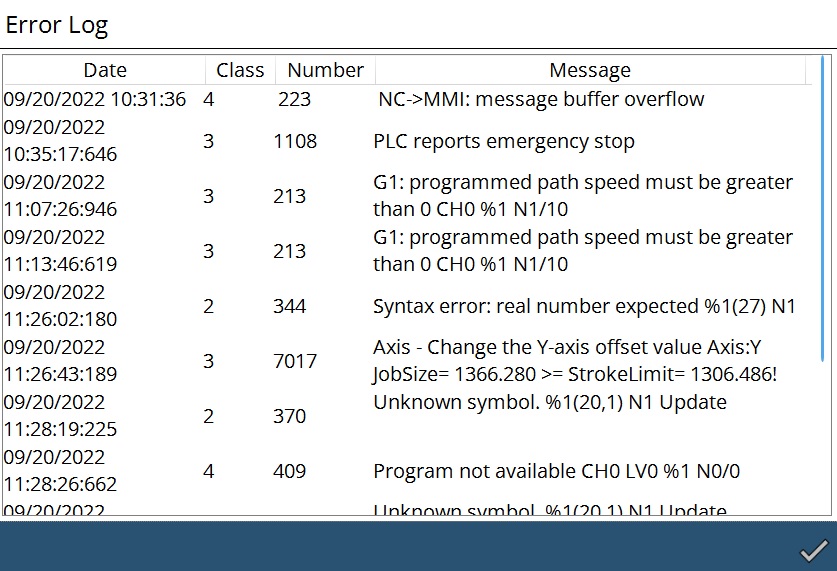
Error log window

Load backup

User can load the backup of Data, Programs and Log folders in Zip file.
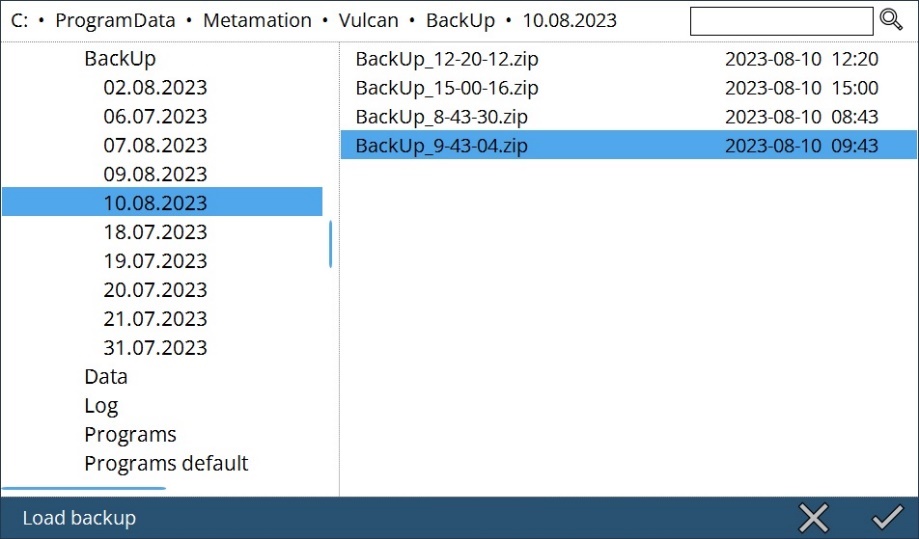
Load Backup window

Save backup

User can enable the required options to save backup of Data, Programs and Log folders.
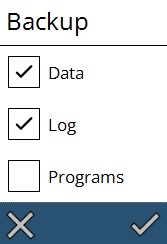
Save Backup window

Vulcan will zip the contents accordingly and save it. Also, when there is a crash, the backup will be done automatically.

License

User can check the license details.
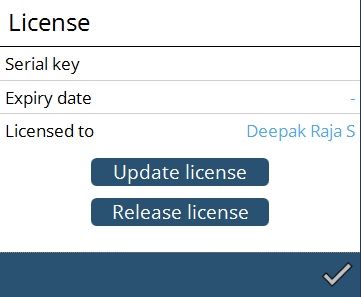
License window

Oscillator data

By clicking, user can view the data of oscillator application. Here we used nLight application.
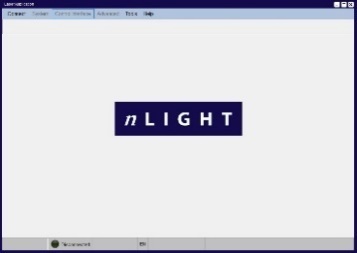
Oscillator application

If none of the oscillator application is linked, it will give a message as below,
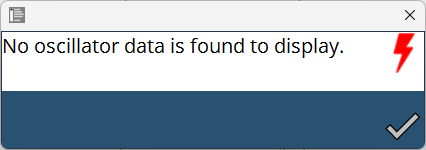
No Oscillator display message

Contents

  • Error log
  • Load backup
  • Save backup
  • License
  • Oscillator data
Backup settings Programming manual

      Copyright © 2025 TRUMPF Metamation. All rights reserved.

    Compiled by Bento